HelpfulDesk Walkthrough (Nahamcon 2024 CTF)

Title: HelpfulDesk
Released for: Nahamcon 2024 CTF
Difficulty: Easy but maybe Easy Plus
HelpfulDesk was an Easy (easy plus?) web challenge from the 2024 Nahamcon CTF written by yours’s truly. It’s an emulation of the discovery and exploitation of the ConnectWise ScreenConnect authentication bypass vulnerability from February 2024.
Understanding the ConnectWise ScreenConnect CVE-2024-1709 & CVE-2024-1708 | Huntress
When you complete this challenge, you’re retracing the (more or less) exact steps that the Huntress Research team performed to reverse engineer the program and devise an exploit for the authentication bypass vulnerability. Let’s get into it!
Enumeration
After starting the challenge, we connect to the provided site and see a simple web app with a login panel. This is the HelpfulDesk web app and proclaims that it is “your trusted partner for remote monitoring and management.”

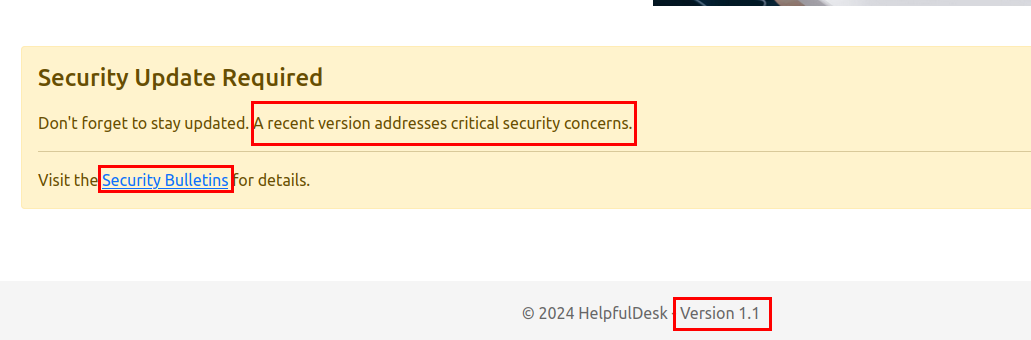
We can find two additional details on this pate: HelpfulDesk recently released a critical security patch that can be found at the Security Bulletins page. We also see that this application is version 1.1.
Once we browse to the Security Bulletin page, we see the list of recent patches and a brief description of what they fix. The patch from 1.1 to 1.2 apparently fixes some critical security vulnerability that can lead to remote code execution. Given that the web app we’re enumerating is at v1.1, this is clearly our line for exploitation.
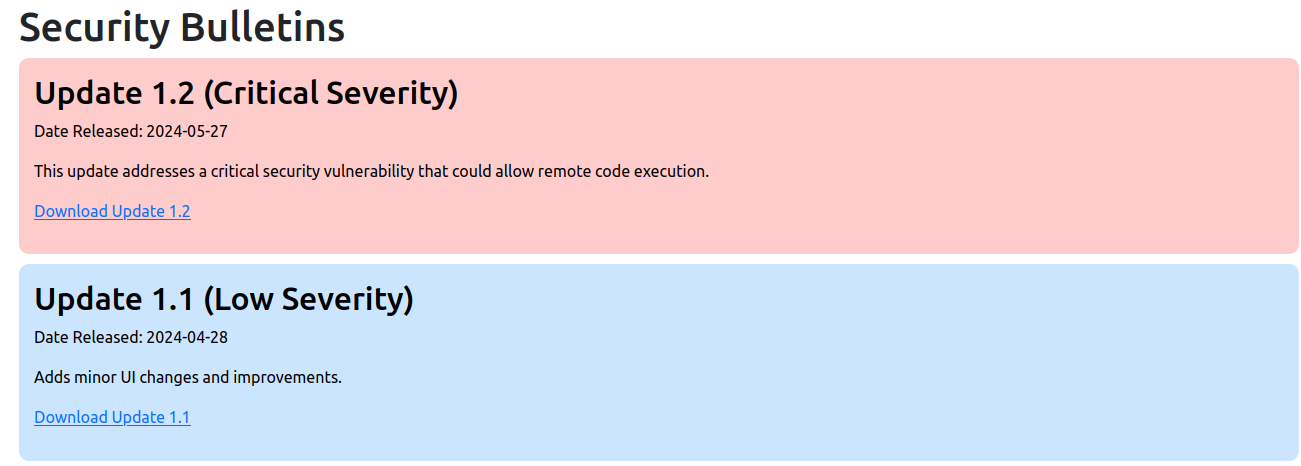
We can download both versions of the application from their respective links.
So we have the unpatched version and the patched version. What do we do now?
Patch Diffing
When we open up the web application files, there’s lots of junk to sift through. The two most important files to run this webapp are the HelpfulDesk.exe and HelpfulDesk.dll files that reside in the application root.
We can quickly enumerate the file type of the DLL and learn that it is a ASP .NET assembly DLL. We can make an educated guess that this web app is written in .NET, which means we can cleanly decompile and recreate the application’s source code with something like dnSpy.
husky@dev-ubuntu:~/Desktop$ file HelpfulDesk.dll
HelpfulDesk.dll: PE32 executable (console) Intel 80386 Mono/.Net assembly, for MS Windows
If we use dnSpy to decompile both DLLs from the v1.1 files and the v1.2 files, we can use the diff utility to compare the recreated source code. There is one line specifically that was changed that should be very interesting:
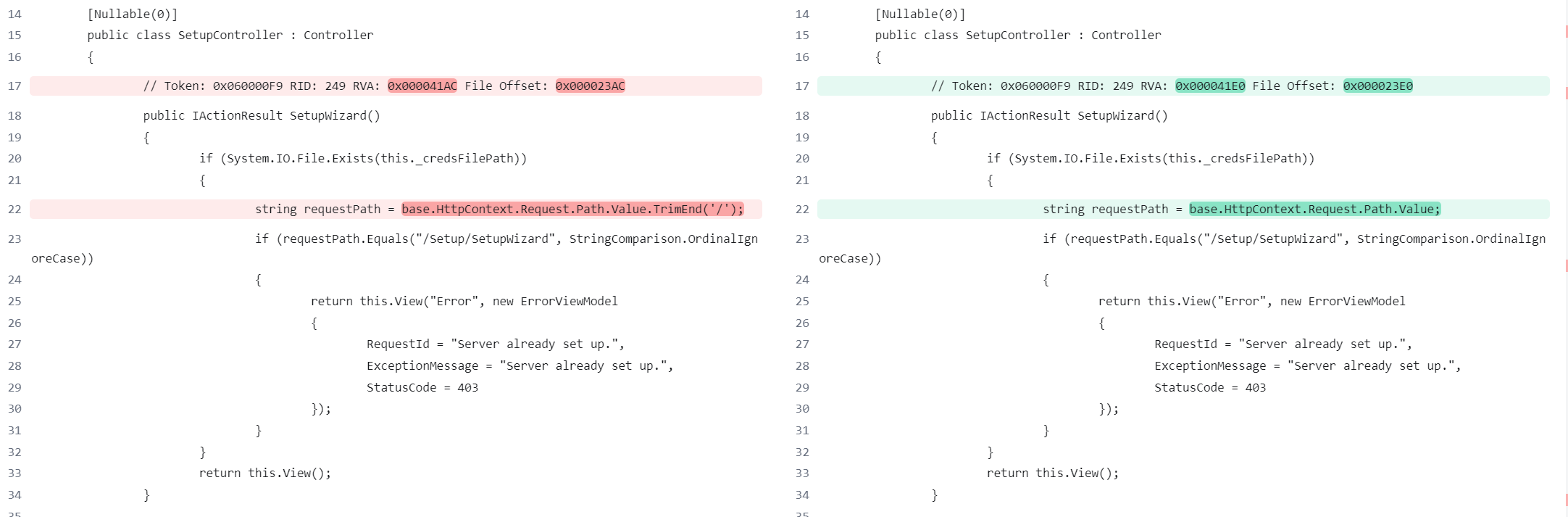
This line lives in the SetupController class for the web application, which is essentially the engine that drives the request and response functionality of ASP .NET. When you request an ASP .NET web page, the Controller for that page decides what happens and what you see. This specific class handles how the web app behaves pre and post setup. In other words, it lets you set the initial setup credentials for the admin user if the web app has not been set up yet.
If we compare the two DLLs by diffing, we see that a new check was added to the requestPath check
   public IActionResult SetupWizard()
        {
            if (System.IO.File.Exists(_credsFilePath))
            {
                // This is the patched version 1.2
                var requestPath = HttpContext.Request.Path.Value.TrimEnd('/');
                if (requestPath.Equals("/Setup/SetupWizard", StringComparison.OrdinalIgnoreCase))
                {
                    return View("Error", new ErrorViewModel { RequestId = "Server already set up.", ExceptionMessage = "Server already set up.", StatusCode = 403 });
                }
            }

            return View();
        }
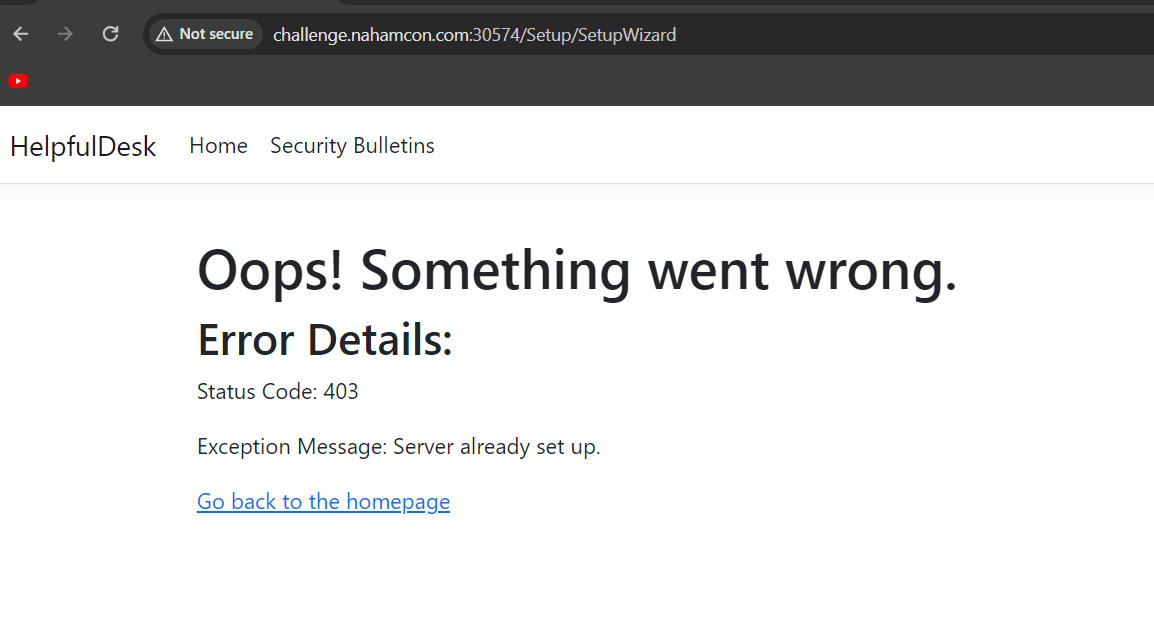
This code first checks if the web app already has a credential file (a low effort CTF analog for an authentication database 😜). If the file does not exist, it renders the setup page and allows the user to specify the initial pair of admin credentials for the first use. But if the cred file does exist, it trims a trailing slash off of the request path and checks to make sure that it equals “/Setup/SetupWizard” before finally rendering the error page with the “Server already set up” message.
We can check this by visiting that endpoint.
Exploitation
The major difference between v1.1 and v1.2 is that the trailing slash is removed in the patched version and not removed in the unpatched version. So one may posit that the vulnerability is that a user can access the SetupWizard by skipping the if (requestPath.Equals("/Setup/SetupWizard", StringComparison.OrdinalIgnoreCase)) check. Even if the web app is already set up, skipping this if block will land the player on the SetupWizard page, where they can set up the admin user’s creds. This will overwrite the original admin’s creds and allow the player to log in.
How can we skip this if block and land on the SetupWizard page? Easy. Add a forward slash and literally anything else.
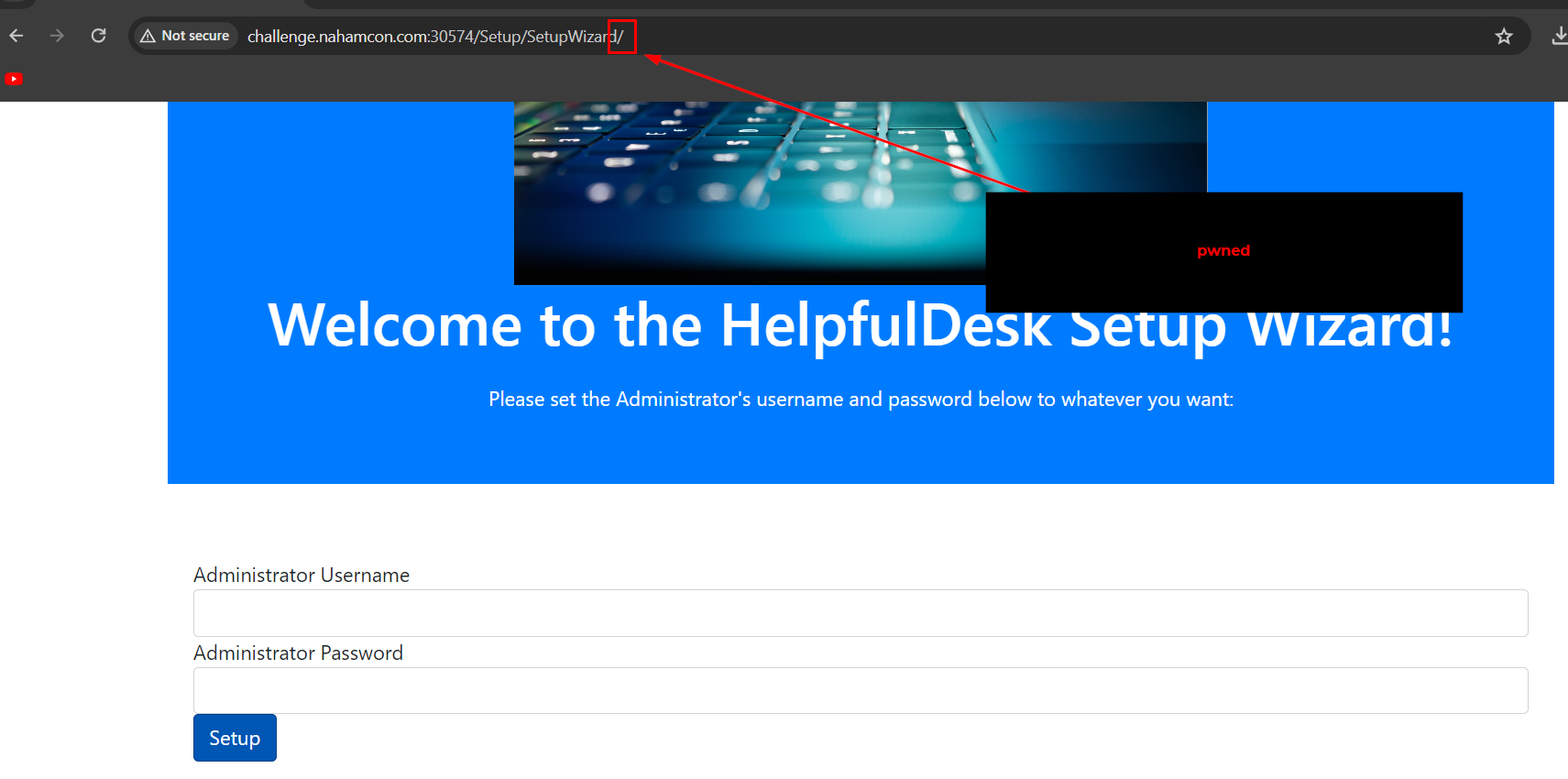
In the original code, the requestPath is compared directly to the string "/Setup/SetupWizard" without accounting for any trailing slashes. This means that the comparison will only succeed if the path is exactly "/Setup/SetupWizard". If the player adds a trailing slash, making the request path "/Setup/SetupWizard/", the comparison will fail because the strings do not match exactly, which lands the player on the SetupWizard page even if the web app is already set up.
From here, the player can complete the challenge by injecting a new set of credentials into the app, logging in, and pilfering the “connected” hosts.
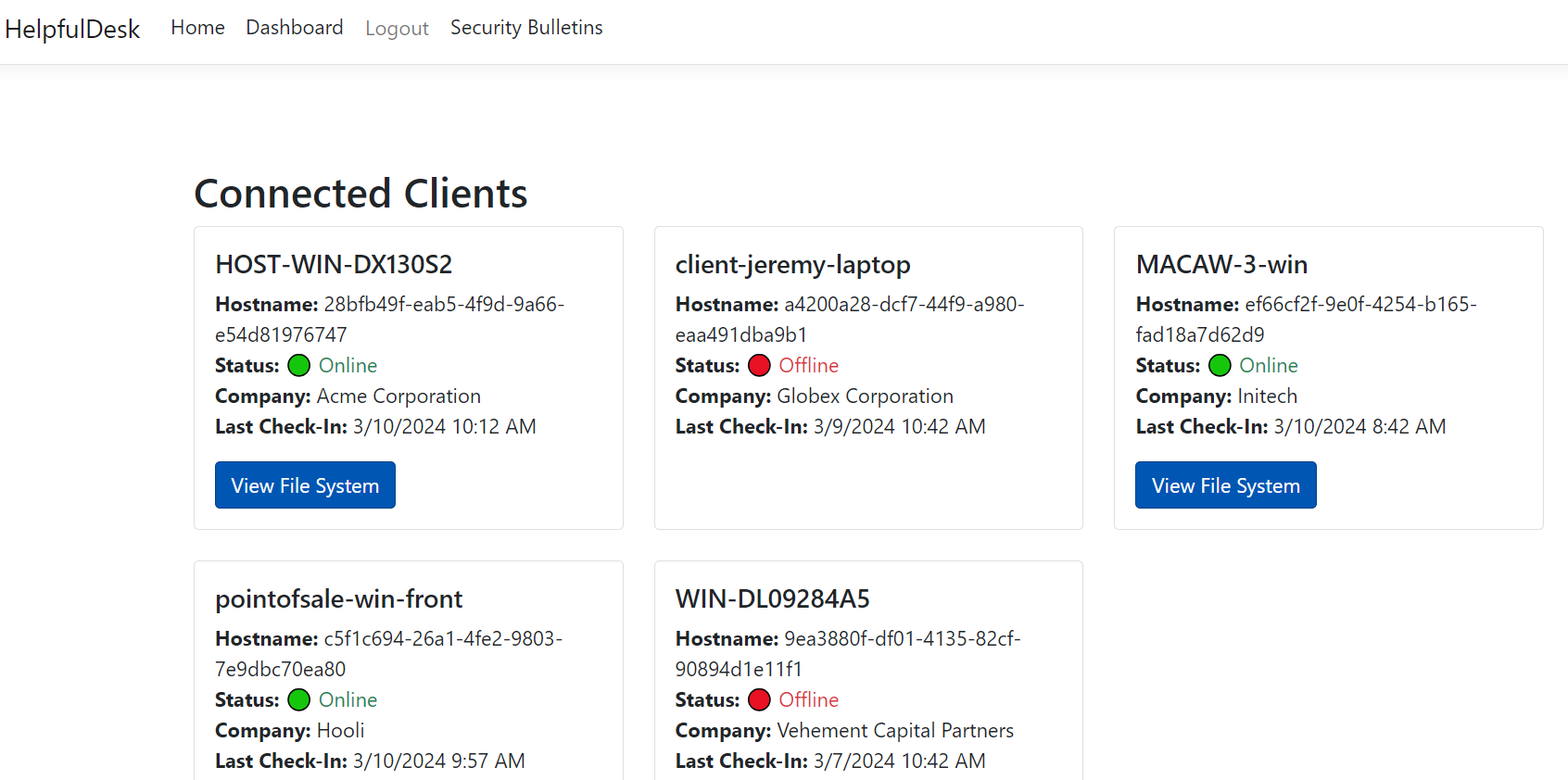
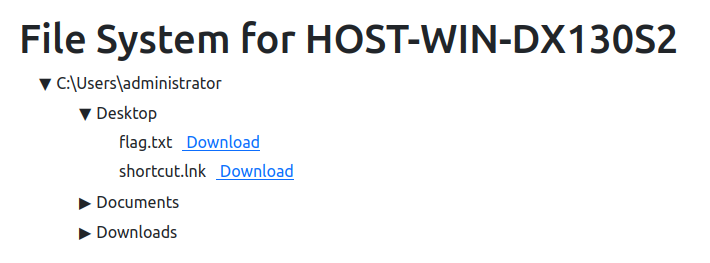
The web app has a fabricated file browser for these “connected” hosts just to add a little flair to the challenge. The flag is on the Desktop of the Admin user on the HOST-WIN-DX130S2 host:
Hope you enjoyed that one!
-Husky